글

라벨이 Programming인 게시물 표시

[Git/GitHub] SSH 키 생성부터 GitHub 연결까지, 5분 완성 가이드 (feat. Permission denied 해결법) 🔑

 GitHub 저장소를 HTTPS로 사용하다 보면 push할 때마다 아이디와 토큰(Personal Access Token)을 입력해야 해서 번거로운 순간이 있습니다. 오늘은 SSH 키를 등록해서 비밀번호 없이 바로 접속하는 방법을 정리해보겠습니다. 🤔 SSH는 왜 편할까? HTTPS 방식은 매번 인증 정보를 확인하지만, SSH 방식은 미리 등록해둔 키 쌍(개인키/공개키)으로 자동 인증을 합니다. 한 번만 설정해두면 이후로는 git push, git pull 할 때 별도 로그인 절차 없이 바로 사용할 수 있습니다. 🔑 1단계: 기존 키 확인 먼저 이미 만들어둔 SSH 키가 있는지 확인합니다. ls -al ~/.ssh id_ed25519, id_rsa 같은 파일이 보이면 기존 키를 재사용해도 되고, 디렉터리가 아예 없다면(No such file or directory) 새로 만들면 됩니다. 🚀 2단계: SSH 키 생성 # 1. ed25519 방식으로 키 생성 (최신 방식, RSA보다 안전하고 빠름) # 2. -C 옵션은 키를 구분하기 위한 주석(보통 이메일) # 3. -f 옵션으로 파일명을 원하는 이름으로 지정 가능 ssh-keygen -t ed25519 -C "example@email.com" -f ~/.ssh/id_ed25519_github 실행하면 패스프레이즈(암호)를 입력하라고 나오는데, 보안을 위해 설정하는 것을 권장합니다. 완료되면 ~/.ssh 안에 개인키(id_ed25519_github)와 공개키(id_ed25519_github.pub) 두 개의 파일이 생성됩니다. ▎ ⚠️ 개인키 파일은 절대 외부에 공유하거나 블로그·깃허브 등에 업로드하면 안 됩니다. GitHub에 등록하는 건 반드시 .pub로 끝나는 공개키입니다. 📋 3단계: GitHub에 공개키 등록 pbcopy < ~/.ssh/id_ed25519_github.pub 위 명령으로 공개키 내용을 클립보드에 복사한 뒤, GitHub 우측 상단 프로필 → Settings...
C# 정수형 Types List (long vs float)

C# Data Type List C# Data Type은 크게 Values Types 와 Reference Types 구분 됩니다. 표로 잘 정의된 내용은 요기 링크를 참조 하시면 됩니다. 일 하다가 헷갈리는건 프로그래밍 언어와 Database 사이의 매핑되는 데이터 형식이다. 그 중에서 헷갈리는 것만 몇개 표로 적어둔다. (수학적인 내용은 아래 위키백과 링크를 참고) 소수점 유형의 타입을 이용할 때는 정밀도를 확인 할 것! Type Range Size .NET Java T-Sql MySql int -2,147,483,648 to 2,147,483,647 Signed 32-bit integer System.Int32 int int int long -9,223,372,036,854,775,808 to 9,223,372,036,854,775,807 Signed 64-bit integer System.Int64 long bigint bigint float ±1.5 x 10−45 to ±3.4 x 1038 4 bytes System.Single float float float double ±5.0 × 10−324 to ±1.7 × 1030 8 bytes System.Double double float double decimal ±1.0 x 10⁻²⁸ to ±7.9228 x 1028 1...

Spring-boot & mybatis & mysql - java.sql.SQLException: Incorrect integer value: 'string_value' for column 'column_name' at row 1

Error using Enum Type in Spring-boot, Mysql, Mybatis environment. Incorrect integer value: 'string_value' for column 'column_name' at row 1 Java Person class public class Person { private int id ; private String name ; private AgeType age ; private String email ; } public enum AgeType { One ( 1 , " 일 " ) , Two ( 2 , " 이 " ) , Three ( 3 , " 삼 " ) , Four ( 4 , " 사 " ) , Five ( 5 , " 오 " ) ; } Mysql DB Person table +-----------------------+ | Tables_in_spring-boot | +-----------------------+ | Person | +-----------------------+ 1 row in set (0.01 sec) mysql> desc Person; +-------+-------------+------+-----+---------+----------------+ | Field | Type | Null | Key | Default | Extra | +-------+-------------+------+-----+---------+----------------+ | id | int | NO | PRI | NULL | auto_increment | | name | varchar(30) | NO | | NULL ...

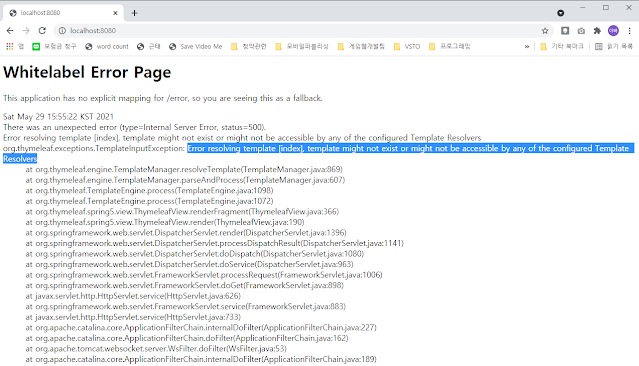
[Solved] template might not exist or might not be accessible by any of the configured Template Resolvers

이미지
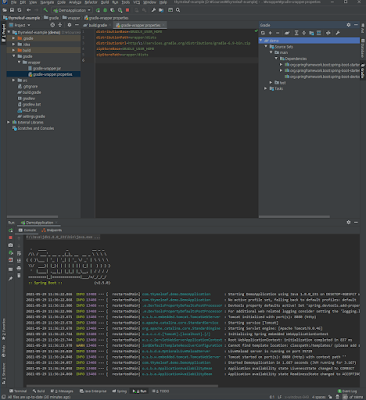
Spring-Boot + Thymeleaf + Intellij (2019.2) 사용 중 오류. #Error Message 2021-05-29 15:55:22.941 ERROR 25300 --- [nio-8080-exec-1] org.thymeleaf.TemplateEngine              : [THYMELEAF][http-nio-8080-exec-1] Exception processing template "index": Error resolving template [index], template might not exist or might not be accessible by any of the configured Template Resolvers org.thymeleaf.exceptions.TemplateInputException: Error resolving template [index], template might not exist or might not be accessible by any of the configured Template Resolvers at org.thymeleaf.engine.TemplateManager.resolveTemplate(TemplateManager.java:869) ~[thymeleaf-3.0.12.RELEASE.jar:3.0.12.RELEASE] #Situation IntelliJ IDEA 2019.2.4 Java jdk 1.8.0_231 gradle 7.0.2 org.springframework.boot 2.5.0 #Step 1. Create Project - Project SDK : java version "1.8.0_231" - Type : Gradle Project - Java Version : 8 - Dependencies  - Developer Tools : Srping Boot DevTools - Web : S...

[Solved] org.gradle.api.tasks.SourceSet.getCompileConfigurationName()Ljava/lang/String

이미지
 Gradle Build failed org.gradle.api.tasks.SourceSet.getCompileConfigurationName()Ljava/lang/String 그냥 아침에 간단히 테스트 해보고 싶은게 있어서 IntelliJ를 켜고 Spring-Boot 프로젝트를 생성했다. 그런데 생성과 동시에 실패의 메시지를 보니 대체 이게 무슨 일인지. Error Message FAILURE: Build failed with an exception. * What went wrong: Failed to notify build listener. > org.gradle.api.tasks.SourceSet.getCompileConfigurationName()Ljava/lang/String; * Try: Run with -stacktrace option to get the stack trace. Run with --info or --debug option to get more log output. * Get more help at https://help.gradle.org CONFIGURE FAILED in 555ms 우선 영어는 언제 만나도 당황스럽다. 이것 저것 검색을 해 보았으나 마땅한 해결책이 없다. 아니 해결책이 적혀 있었다고 하더라도 영어라서 이해 못하고 놓친것 일수도... 대신 비슷해 보이는 내용 중에 이런게 있었다. Gradle 7.0 버전일 때 import failed or build fails Link :  https://youtrack.jetbrains.com/issues?q=getCompileConfigurationName# 그래서 Gradle 버전을 바꿔 보기로 했다. Gradle Releases  를 보면 내가 사용중이던 7.0.2가 최신이고. 나는 6.9로 Downgrade 하기로 했다. [Solved] Gradle Downgrade...

[Solved] jQuery - parsererror SyntaxError: Unexpected end of JSON input

 Unexpected end of JSON input jQuery.ajax를 사용하다가 위와 같은 오류를 접했다. parameter가 잘못된거 같은데 잠시 삽질을 했다. [Error Message] SyntaxError: Unexpected end of JSON input at parse ([anonymous]) at jquery.min.js:2 at l (jquery.min.js:2) at XMLHttpRequest.[anonymous] (jquery.min.js:2) [Error Code] $.ajax({ url: 'https://www.example.com/api', method: 'POST', data: $.param(param), dataType: 'json', contentType : 'application/json', success: function (data) { console.log(data); }, error: function (_e, _x, _s) { console.log(_e, _x, _s); } ); [Solved Code] $.ajax({ url: 'https://www.example.com/api', method: 'POST', data: JSON.stringify(param) , dataType: 'json', contentType : 'application/json', success: function (data) { console.log(data); }, error: function (_e, _x, _s) { console.log(_e, _x, _s); } ); 너무 오랜만에 타이핑을 쳐서 사용했더니 이런 낭패가 생기는구나.